Miqenekor
Axis Set
Axis Set
Couldn't load pickup availability
Share
1. Problem Statement
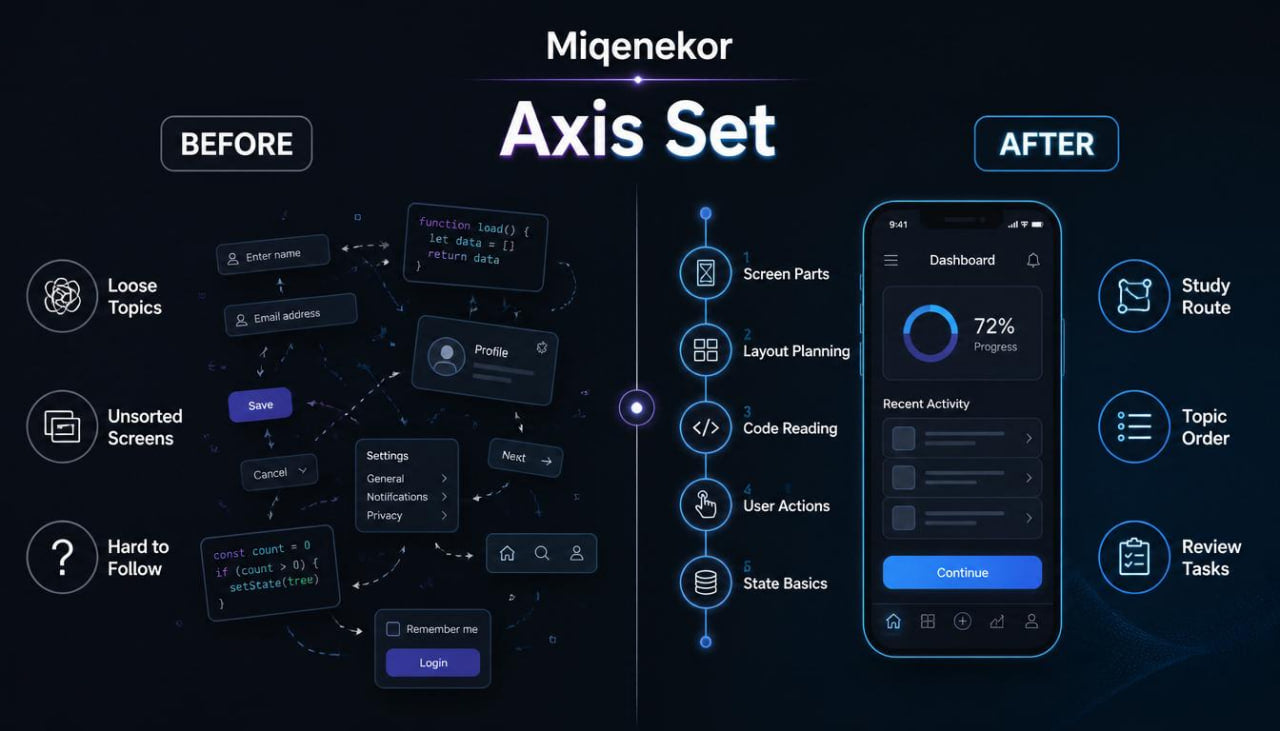
Many learners begin mobile development by collecting pieces of information from different places, but those pieces often do not form a steady study route. One page may explain code structure, another may describe screens, another may mention user actions, and another may introduce data handling before the learner has a clear base. This can make the subject feel scattered, even when the learner is interested and ready to study. A common difficulty is not the topic itself, but the missing connection between visual screen parts, code sections, and the logic behind user actions. Axis Set was created to give learners a more organized beginning, where each topic has a place and each practice task connects to the previous idea.
2. Solution
Axis Set gives learners a structured entry into mobile development through calm explanations, clear module order, and practice tasks that grow gradually. The materials begin with screen anatomy, simple layout planning, code reading, and user action logic before moving into slightly wider examples. Each module is written to help learners understand how mobile interfaces are planned, described, and connected to code behavior. Instead of mixing many advanced ideas at once, Axis Set keeps the learning path focused on the starting layer of mobile development. This makes the tier suitable for learners who want more than a sample, but still need a careful and readable beginning.
3. What’s Inside
Axis Set includes a wider set of Miqenekor learning materials arranged around beginner mobile development topics. The tier is designed as a first full study step, with written modules, examples, task prompts, review notes, and a small glossary that grows from the Free Kit format.
The first module introduces mobile development as a combination of screen structure, interface behavior, and code organization. It explains how an application screen can be studied as a set of visible parts and hidden instructions. Learners review the difference between what a user sees, what a user does, and what the code needs to describe. This section includes short diagrams in text form, naming examples, and simple planning notes.
The second module focuses on screen anatomy. It breaks a mobile screen into areas such as top section, content section, action section, input section, message area, and navigation point. Learners study how these areas can be described before code is written. The module includes practice prompts where learners describe a simple screen using plain words, then connect each part to a possible code role.
The third module introduces layout thinking. It explains spacing, grouping, visual order, and repeated blocks without using design-heavy language. The goal is to help learners understand how content can be arranged in a mobile screen before moving into behavior. The examples show how a list, a form, a card, and a small detail screen can be planned from simple parts. The practice section asks learners to compare two screen plans and explain which parts belong together.
The fourth module focuses on code reading. Axis Set does not begin with large files or complex projects. Instead, it uses short code-style examples with plain-language notes. Each example includes a small screen idea, a related code fragment, and a breakdown of what the fragment is describing. Learners see how names, structure, and order can make code easier to follow during study. This section also introduces the habit of reading code in small blocks instead of treating the full file as one large object.
The fifth module introduces user actions. Learners study what happens when a person taps a button, enters text, changes a screen value, or moves from one screen to another. The materials explain these actions as simple cause-and-response patterns. For example, a button may request a change, an input field may store text, or a navigation step may lead to another screen. The explanations stay practical and focused on beginner understanding.
The sixth module introduces basic state thinking. This section explains that a screen can show different information at different moments. A field can be empty or filled, a message can be visible or hidden, and a list can have items or no items. Learners review simple examples of how a mobile screen can react to changes. The module includes short practice tasks where learners describe screen states in plain language before looking at code-style notes.
The seventh module contains review tasks and recap pages. These pages help learners return to the main ideas: screen parts, layout grouping, user actions, code sections, and state changes. The review tasks include short written questions, matching terms, small planning prompts, and code reading exercises. The glossary includes terms used throughout the tier, written in a concise and readable style.
Axis Set also includes a course map that shows how the modules connect. This map is useful for learners who want to understand the order of topics before starting. It shows that mobile development study can begin with observation, then planning, then code reading, then behavior, then review.
4. Who Is This For?
Axis Set is for learners who want a full beginner tier after seeing the Miqenekor sample style. It is suitable for people who are new to mobile development and want written materials that move in a clear order. It may also fit learners who have seen code before but still want to organize the basics of screen structure, layout planning, and user action logic.
This tier is for learners who prefer reading, examples, structured notes, and small tasks. It does not rely on hype or broad outcome claims. Instead, it gives learners a grounded way to study mobile development topics one section at a time.
Axis Set can also be useful for people who want to review beginner ideas before moving into deeper Miqenekor tiers. It gives a base for later topics by introducing the language and structure used throughout the course collection.
5. What You’ll Learn
- How to describe a mobile screen through visible areas and code-related roles.
- How to separate screen structure, layout planning, user actions, and behavior logic.
- How to read short code-style examples with notes beside each section.
- How to identify common mobile screen parts such as header area, content block, input section, action area, and message space.
- How layout grouping can make a screen plan more organized.
- How user actions can be described as simple cause-and-response patterns.
- How screen states can change based on user input or displayed information.
- How to write plain-language notes before connecting an idea to code.
- How to use review tasks to revisit core ideas from each module.
- How Miqenekor arranges beginner mobile development topics into a steady study route.
- How to compare simple screen plans and explain the role of each section.
- How to approach code reading without starting from large project files.
- How to build a beginner vocabulary for mobile development study.
- How to prepare for wider tiers by understanding the starting structure of the subject.
6. 30-Day Refund Note
Axis Set is covered by the Miqenekor 30-day refund policy for eligible paid orders. Customers can review the course materials and contact the Miqenekor team through the store contact page if they have a request related to their order. The policy is written to keep the process clear and simple for customers while following the store’s terms. Since digital materials are involved, any request should be sent with the order details so the team can review it properly.
Self-paced learning overview
- 📄 Digital file available after purchase
- 🗂️ Long-term availability
- 🔒 Secure checkout
- 🗓️ Content updated in 2026
What format are Miqenekor courses provided in?
What format are Miqenekor courses provided in?
Miqenekor courses are provided as digital learning materials with written modules, code examples, practice tasks, review notes, and structured topic sections. The materials are made for self-paced study and can be reviewed in parts.
Do I need previous mobile development knowledge?
Do I need previous mobile development knowledge?
No previous mobile development background is required for the starting tiers. The early materials begin with basic ideas, simple code structure, screen logic, layout thinking, and small practice tasks.
Can I study at my own pace?
Can I study at my own pace?
Yes. Miqenekor courses are arranged so learners can move through the materials gradually, repeat sections, and return to examples when needed.