Miqenekor
Flux Course
Flux Course
Couldn't load pickup availability
Share
1. Problem Statement
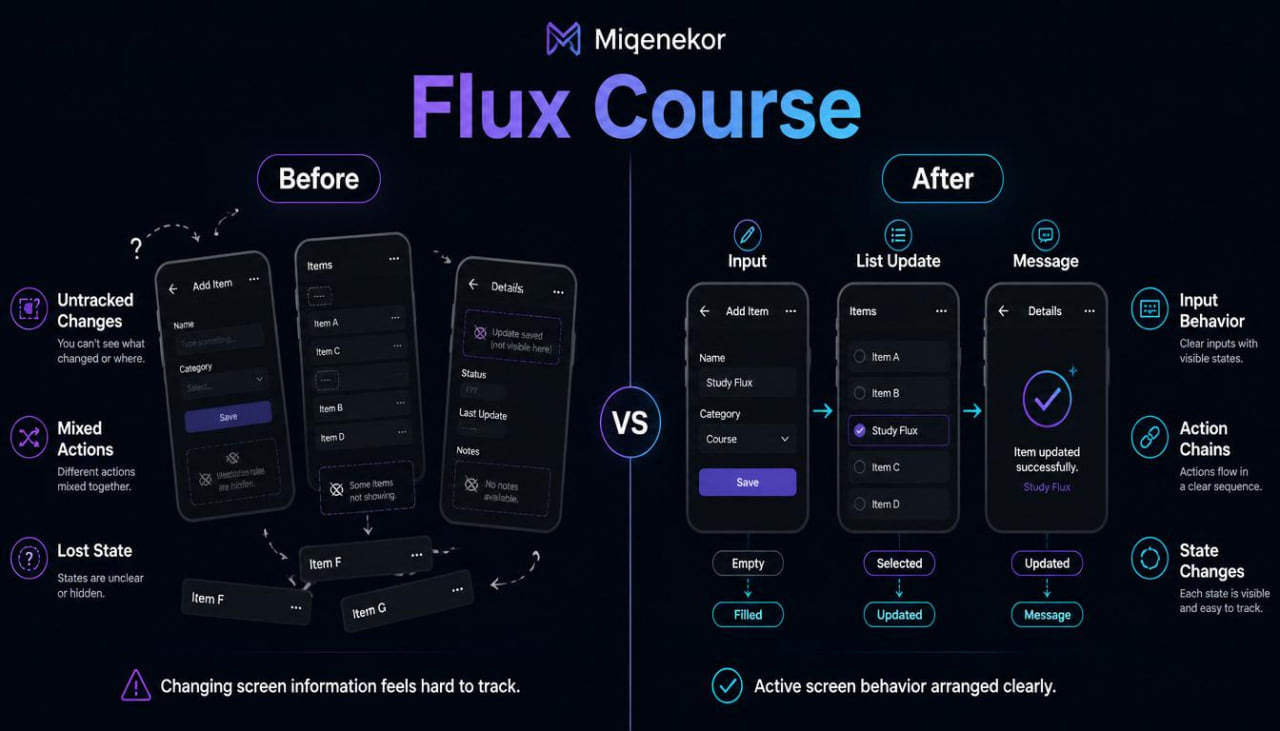
After learners understand basic screen parts and reusable sections, a new difficulty often appears: screens are not always still. Information can change after a user writes text, selects an item, removes an entry, opens another screen, or returns to a previous view. A learner may understand one simple screen example, but feel unsure when several actions affect what should appear next. Another challenge is reading code examples where values, actions, and display changes are mixed together without enough explanation. Flux Course was created for this stage, where learners need a clearer way to study movement, change, and response inside mobile development materials.
2. Solution
Flux Course organizes active mobile development topics into readable written modules, short code-style examples, and practice tasks. The materials explain how screens can respond to input, how information can be updated, and how a user flow can be described before code becomes more detailed. Each topic is introduced through a small scenario, then expanded with notes, examples, and review prompts. The course keeps a steady study rhythm by connecting each new idea to screen structure, reusable sections, and state thinking from earlier tiers. This makes Flux Course a useful continuation for learners who want to study mobile behavior with more order and less noise.
3. What’s Inside
Flux Course includes a detailed set of digital learning materials centered on screen behavior, changing information, interactive flow, and beginner-friendly logic patterns. It builds on earlier Miqenekor tiers by taking screen frames and reusable blocks into more active examples.
The first module introduces change inside a mobile screen. Learners review the idea that a screen can show one version at the start, another version after input, and another version after an action. The module explains this with simple examples: an empty field becomes a filled field, a hidden message becomes visible, a list gains a new item, or a detail screen updates after a choice. The material uses plain wording to show that mobile development often involves observing what changes and why.
The second module focuses on input behavior. Learners study how text fields, option choices, and small form sections can affect screen information. The examples show how input can be collected, checked, stored in a temporary way, and then shown back on the screen. The course does not begin with large form systems. Instead, it uses small pieces: one field, one action, one response, and one review question at a time. This gives learners room to understand the role of each part.
The third module introduces action chains. A single user action can sometimes lead to several results: a value changes, a message appears, a section is cleared, or a screen moves to another view. Flux Course explains these chains through written flow notes. Learners practice describing a flow before reading the code-style example. For example, a learner may write: “The user enters a name, selects a category, taps the action, then the screen shows a short message.” This plain-language step prepares the learner for the code explanation that follows.
The fourth module studies list behavior. Many mobile interfaces use lists to show entries, choices, notes, items, or saved information. Flux Course explains how a list can begin empty, show several entries, update after a new entry, or change when an item is selected. The examples stay focused on simple cases, with short explanations of each visible change. Learners review how list items can be described as repeated blocks and how each block can carry a small role inside the screen.
The fifth module focuses on messages and feedback areas. Learners study how a mobile screen can show short text after an action, such as a reminder, note, warning, confirmation-style message, or empty state explanation. The material explains where message areas can be placed and how they relate to user actions. This section also includes review prompts that ask learners to decide which message should appear after a specific action.
The sixth module introduces navigation flow in a practical way. Learners study movement from one screen idea to another: from a list to a detail view, from a form to a review page, or from a starting screen to a settings-style page. The course explains navigation as a path of user decisions rather than a confusing technical topic. Each example includes a written route, a screen summary, and a code-style note that describes the movement point.
The seventh module connects state thinking with screen behavior. It explains that state can be seen as the current condition of a screen: empty, filled, loading, selected, edited, cleared, or showing a message. Learners review small scenarios and identify which state is being shown. The module uses comparison tables to show how one screen can have several conditions without becoming confusing.
The eighth module focuses on reading active code examples. Earlier tiers introduced code reading through static sections. Flux Course adds examples where code describes a change. Learners examine short fragments and identify the role of values, actions, display sections, and response notes. The material highlights how code can be read in pieces: first the visible structure, then the stored value, then the action, then the visible result.
The ninth module contains applied practice tasks. Learners are asked to describe a small screen flow, label the role of each action, explain what changes after user input, and rewrite a short example in plain language. Some tasks ask learners to complete missing flow notes. Others ask them to match a screen state with the action that caused it.
Flux Course also includes recap pages, glossary updates, and structured review sheets. The glossary expands with terms such as input state, empty state, selected item, action chain, display update, feedback area, navigation route, and list change. The review sheets are written to support repeated reading, so learners can return to the main ideas after finishing a module.
4. Who Is This For?
Flux Course is for learners who already understand basic mobile screen structure and want to study how screens react to user actions. It is suitable for learners who have reviewed Free Kit, Axis Set, or Frame Bundle, and now want a more active course tier.
This tier may also fit learners who can read simple code examples but feel unsure when values, actions, and display changes appear together. It is written for people who want to understand mobile development through examples, flow notes, review prompts, and short tasks.
Flux Course is also useful for learners who prefer a structured written format. It does not rely on dramatic claims or pressure-based wording. The course focuses on practical study materials, steady topic order, and examples that connect visible screen behavior with code thinking.
5. What You’ll Learn
- How mobile screens can change after user input or actions.
- How to describe screen behavior using plain-language flow notes.
- How input fields, option choices, and action areas can affect displayed information.
- How to identify what changes before, during, and after a user action.
- How simple action chains can be studied without mixing too many topics at once.
- How lists can begin empty, display entries, update, or react to selection.
- How message areas can appear after different user actions.
- How navigation routes can connect one screen idea to another.
- How state thinking applies to filled, empty, selected, edited, or cleared screen conditions.
- How to read code-style examples that include values, actions, and display updates.
- How to separate visible structure, stored information, interaction points, and results.
- How to use recap pages and glossary notes while reviewing active screen behavior.
- How to prepare for deeper Miqenekor tiers that include broader app-style structures.
6. 30-Day Refund Note
Flux Course is covered by the Miqenekor 30-day refund policy for eligible paid orders. Customers can contact the Miqenekor team through the store contact page with order details if they have a refund-related request. The request is reviewed according to the store policy and the digital course format. This note is included so customers can understand the refund window before choosing a paid Miqenekor tier.
Self-paced learning overview
- 📄 Digital file available after purchase
- 🗂️ Long-term availability
- 🔒 Secure checkout
- 🗓️ Content updated in 2026
What format are Miqenekor courses provided in?
What format are Miqenekor courses provided in?
Miqenekor courses are provided as digital learning materials with written modules, code examples, practice tasks, review notes, and structured topic sections. The materials are made for self-paced study and can be reviewed in parts.
Do I need previous mobile development knowledge?
Do I need previous mobile development knowledge?
No previous mobile development background is required for the starting tiers. The early materials begin with basic ideas, simple code structure, screen logic, layout thinking, and small practice tasks.
Can I study at my own pace?
Can I study at my own pace?
Yes. Miqenekor courses are arranged so learners can move through the materials gradually, repeat sections, and return to examples when needed.