Miqenekor
Motion Map
Motion Map
Couldn't load pickup availability
Share
1. Problem Statement
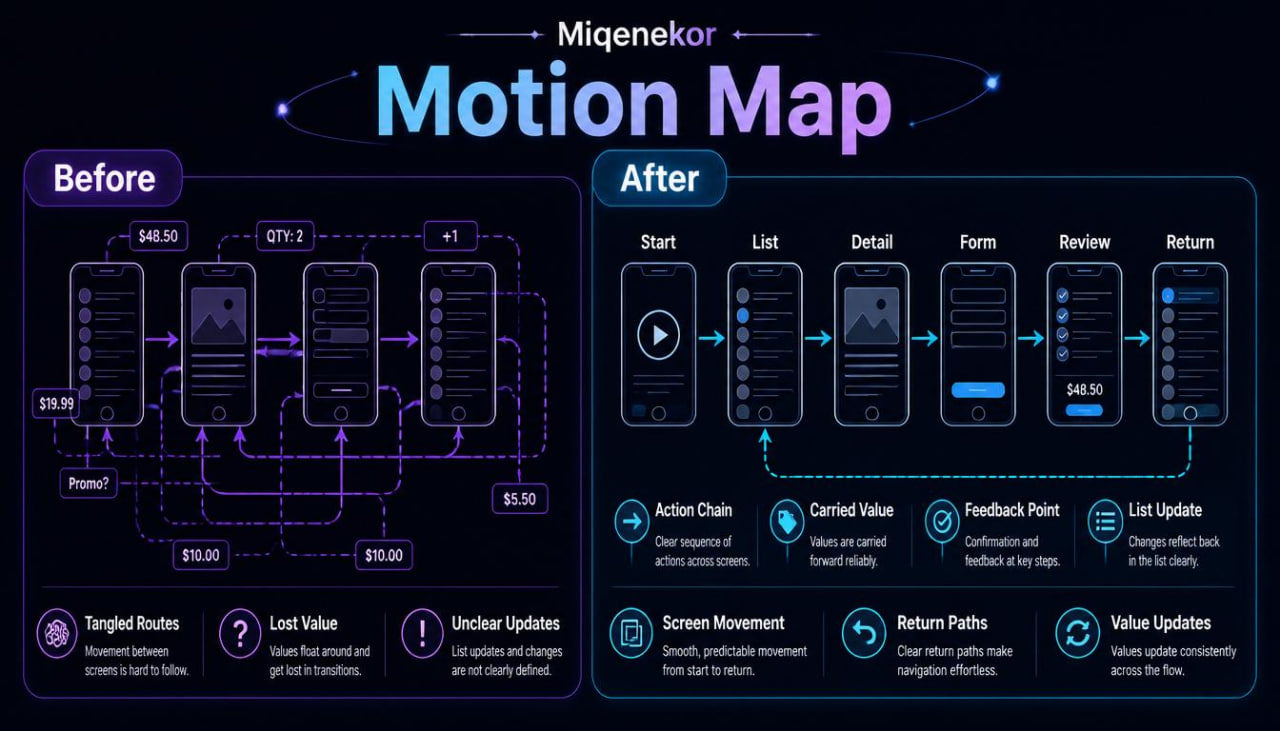
Many learners can understand a single screen when it is shown alone, but mobile development becomes more complex when screens begin to move together. A learner may know how a list works, how a button changes a value, or how a message appears after an action, yet still feel unsure when these ideas become one longer flow. The challenge often appears when one action affects several parts: a selected item opens a detail screen, an edited value returns to a list, or a message appears after a screen update. Without a structured movement map, learners may lose track of where information begins, where it travels, and where it appears next. Motion Map was created for learners who want to study movement, routes, and screen-to-screen behavior with more order.
2. Solution
Motion Map organizes mobile development movement into readable course sections, written flow notes, route diagrams in text form, and code-style examples. Each module studies one part of motion: how a user begins, what action happens, what screen responds, what value changes, and what the learner should review afterward. The course connects screen planning with user flow so learners can see how movement is not random, but built from smaller decisions. Practice tasks help learners describe routes in plain language before studying related code sections. This tier gives a wider view of mobile development while keeping the examples divided into clear learning parts.
3. What’s Inside
Motion Map includes a detailed set of digital course materials centered on screen movement, route planning, action chains, changing screen states, list updates, and multi-step mobile examples. The tier continues the Miqenekor structure by combining written explanations, code-style examples, practice prompts, recap notes, and glossary sections.
The first module introduces motion thinking in mobile development. Learners study how movement can happen inside one screen or between several screens. A screen may change after text is entered, a list may update after an item is added, a detail view may open after selection, or a route may bring the learner back to a previous screen. The module explains that motion is not only animation or visual movement. In this course, motion means the path of actions, values, and screen responses.
The second module focuses on route beginnings. Every route starts somewhere, and learners study how to identify the first screen, the first action, and the first value involved in a flow. Examples include opening a list, choosing an item, starting a form, selecting a category, or reviewing a saved entry. Each example is shown with a short route note and a screen summary. Learners practice writing the first three steps of a route before reading a code-style section.
The third module studies action chains. An action chain is a sequence where one user action creates more than one result. For example, a button may save a value, clear an input, show a message, and move the learner to another screen. Motion Map breaks these chains into separate parts so learners can examine each result carefully. The practice tasks ask learners to name the action, describe the visible result, and explain what information changed.
The fourth module focuses on movement between list and detail screens. This is a common mobile pattern in study materials because it shows how selected information can move from a list row into a detail view. Learners review a list screen, selected item, detail section, return action, and updated display. The course explains how each step can be planned in writing before code is studied. Short code-style examples show where the selected value appears and how the detail screen receives its role in the flow.
The fifth module introduces form-to-review movement. Learners study how entered information can move from an input screen into a review-style screen. The module explains field labels, typed values, action placement, message areas, and summary blocks. Each section is connected to a route note that describes what happens before and after the user action. Practice prompts ask learners to write a plain-language route for a small form scenario.
The sixth module covers list updates and return paths. In many mobile examples, a learner adds or edits information, then returns to a screen where the changed information appears. Motion Map explains this through small scenarios involving notes, categories, saved entries, and selected rows. The materials keep the examples readable by separating the starting list, action screen, changed value, return path, and updated list display. Learners complete exercises that ask them to identify where a value begins and where it appears later.
The seventh module studies visible feedback during movement. A screen route may include a short message, an empty-state note, a status label, or a review reminder. Motion Map explains how feedback text can appear after a route step and how it connects to user actions. Learners compare examples where feedback appears too early, too late, or in a more fitting screen section. The focus is on studying how messages support understanding within a route.
The eighth module focuses on route maps. Learners create text-based movement maps that show screen names, action points, carried values, changed states, and return paths. A map may include a starting screen, a list, a detail view, an edit section, and a summary area. The course provides partially filled maps so learners can complete missing pieces. This helps learners practice organizing a flow before studying code-style examples.
The ninth module studies code reading for moving structures. Learners examine examples by separating visible screen sections, selected values, action functions, route points, and updated displays. The material explains how to read a connected example slowly, from the screen map to the code notes. Learners are encouraged to identify the role of each part rather than trying to read everything as one block.
The tenth module includes larger practice tasks. Learners receive several short mobile scenarios and complete route notes, list update questions, form review tasks, feedback message prompts, and code-reading labels. Some tasks ask learners to compare two routes and explain why the movement is different. Other tasks ask learners to rewrite a route in plain language before matching it with a code-style example.
Motion Map also includes recap pages and a glossary. The glossary adds terms such as route beginning, action chain, return path, selected value, list update, review screen, carried value, movement map, and feedback point. The recap pages help learners revisit each motion topic before moving into the final tier.
4. Who Is This For?
Motion Map is for learners who already understand screen structure, reusable sections, state changes, and basic connected screens. It is suitable for people who want to study longer mobile flows, list-to-detail routes, form-to-review routes, value movement, and return paths.
This tier may fit learners who feel comfortable with smaller examples but need more practice following several steps at once. It is also useful for learners who prefer written maps, route notes, code-style examples, and review tasks. Motion Map can be a strong fit after Grid Map because it takes organized screen planning and adds more focus on movement.
The course is written for learners who want calm, practical study materials without exaggerated claims. It focuses on topic order, route structure, and careful review.
5. What You’ll Learn
- How to study movement inside and between mobile screens.
- How to identify where a route begins and what action starts it.
- How to describe action chains in plain language.
- How list-to-detail routes can carry selected information.
- How form-to-review routes can move entered information into summary sections.
- How list updates can appear after adding or editing information.
- How return paths can be described through screen maps.
- How feedback text can appear during a route.
- How to build text-based movement maps for several screens.
- How to separate screen names, action points, carried values, changed states, and return paths.
- How to read code-style examples that include screen movement and value updates.
- How to compare routes and explain how their structure differs.
- How to prepare for the final Miqenekor tier with broader connected practice.
6. 30-Day Refund Window
Motion Map is included in the Miqenekor 30-day refund window for eligible paid orders. Customers can send a request through the store contact page with order details if they need help related to a paid course order. The request is reviewed according to the store terms and the digital course format. This note is included so customers can understand the refund window before choosing this Miqenekor tier.
Self-paced learning overview
- 📄 Digital file available after purchase
- 🗂️ Long-term availability
- 🔒 Secure checkout
- 🗓️ Content updated in 2026
What format are Miqenekor courses provided in?
What format are Miqenekor courses provided in?
Miqenekor courses are provided as digital learning materials with written modules, code examples, practice tasks, review notes, and structured topic sections. The materials are made for self-paced study and can be reviewed in parts.
Do I need previous mobile development knowledge?
Do I need previous mobile development knowledge?
No previous mobile development background is required for the starting tiers. The early materials begin with basic ideas, simple code structure, screen logic, layout thinking, and small practice tasks.
Can I study at my own pace?
Can I study at my own pace?
Yes. Miqenekor courses are arranged so learners can move through the materials gradually, repeat sections, and return to examples when needed.